

| Bookmark Name | Actions |
|---|
Installing MongoDB
To install MongoDb, follow these steps.
- Download and install the MongoDB server.
- Create a folder named Mongodb in your system.
- In the Mongodb folder, create three new folders named data, log, and conf.

- In the data folder, create three new folders named dbnode1, dbnode2, and dbnode3.

- Copy the following configuration file into the conf folder:
- Change the path of the systemLog > path and storage > dbPath in configuration file to the path where the data and log folders are available.
mongod_node1.conf | mongod_node2.conf | mongod_node3.conf
# where to write logging data. systemLog: destination: file logAppend: true path: C:/Database/Mongo/log/mongodnode1.log #Where and how to store data storage: dbPath: C:/Database/Mongo/data/dbnode1 journal: enabled: true - After the configuration is done, start the Mongodb nodes by using the following commands in Command Prompt.
Starting Mongo DB Nodes
>"C:\Program Files\MongoDB\Server\4.2\bin\mongod" --port 27017 --config C:\Database\Mongo\conf\mongod_node1.conf
>"C:\Program Files\MongoDB\Server\4.2\bin\mongod" --port 27018 --config C:\Database\Mongo\conf\mongod_node2.conf
>"C:\Program Files\MongoDB\Server\4.2\bin\mongod" --port 27019 --config C:\Database\Mongo\conf\mongod_node3.conf
NOTE:- Each command should be executed separately in a new command prompt window.
- Specify the path of the config file before executing the mentioned commands.
- In the Command Prompt, go to the path where MongoDB is installed and run the following commands. The following commands are only for the one-time setup.
Mongo Primary Node Setup
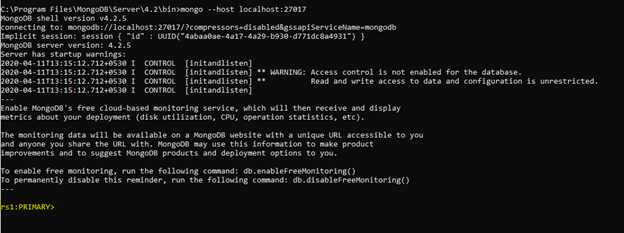
> mongo --host localhost:27017 > config ={"_id" : "rs1","members" : [{"_id" : 0,"host" : "localhost:27017","priority": 2},{"_id" : 1,"host" : "localhost:27018","priority": 0},{"_id" : 2,"host" : "localhost:27019","priority": 0}]}; > rs.initiate(config) - After the setup is done, localhost: 27017 is set as the primary node.
- Start the MongoDB server.
- After the MongoDB server is started, the database and the tables can be created by using the MongoDB Compass.
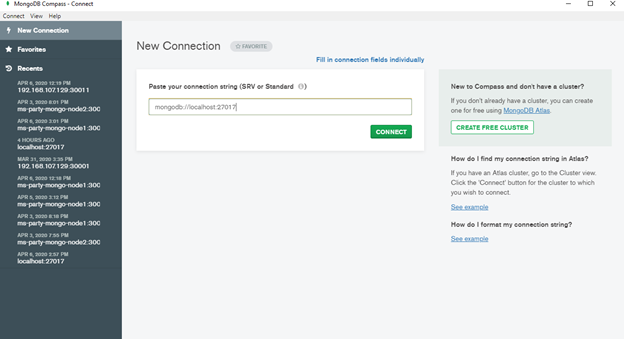
- Connect the MongoDB Compass to the MongoDB server by using the following URL:
mongodb://localhost:27017

- After the connection is done, create the databases and collections as required.
Add Bookmark
save your best linksView Bookmarks
Visit your best links BACK
BACK


Are you sure you want to log-off?